How to choose the best fast charging cable?

Wondering how to choose the best fast charging cable? Check fast charging protocol compatibility, current specs (2A/3A/5A/6A), USB version bandwidth, cable material, length and connector types including USB-C, Lightning and Micro USB. Choose a reliable charging cable for your smartphone, laptop and other portable devices.
Jul 30th,2026 144 Views

How to Choose the Best Fast Charging Cable

As smartphones, laptops, tablets, and other portable devices continue to support higher wattage charging, choosing the best fast charging cable has become more importance than ever. A suitable fast charging cable not only improves charging efficiency but also helps reduce overheating, power loss, and potential damage to your devices.

Choosing the best fast charging cable requires comprehensive consideration of factors such as the fast charging protocol, charging power, and cable material.

1. Check Fast Charging Protocol Compatibility

Different devices typically support different fast charging protocols, including USB PD, Qualcomm QC, Huawei SCP/FCP, OPPO VOOC, vivo FlashCharge, and Xiaomi Pengpai P1. The charging cable must match the fast charging protocol supported by the device to achieve fast charging.

2. Pay Attention to Charging Power and Current Specifications

The current specification of a charging cable determines its maximum supported power.
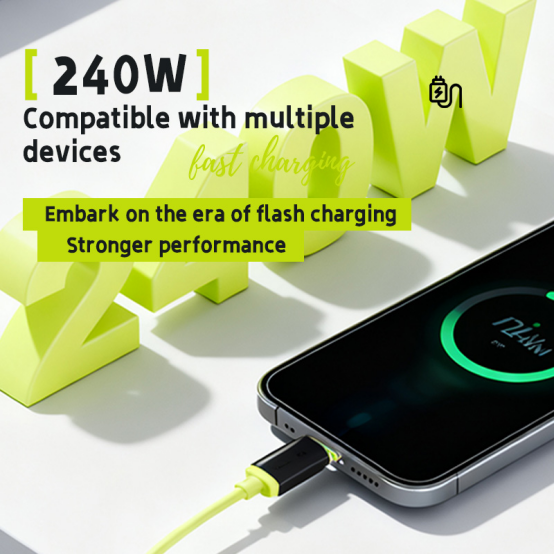
  • 2.1: 2A cable mostly supports 10W-15W charging and is useful for old Android phones and some portable electronic devices, like smart watches, speakers, small fans, hair removal devices, printers, PDAs, and so on.
  • 2.2: 3A cable typically supports 18W-33W fast charging and is suitable for mainstream mobile phones.
  • 2.3: 5A cable supports 40W-100W fast charging and is commonly used for super-fast mobile phone charging and laptop charging.
  • 2.4: 6A cable can support up to 120W or even higher. When purchasing, choose a cable based on the fast charging power required by your device. For example, if you are charging a laptop, it is recommended to choose a cable that supports 65W or 100W power and usually has an E-Marker chip.
Charging Power and Current

3. Check Your Data Transfer Requirements

If you need high-speed data transfer, pay attention to the USB version and bandwidth supported by the charging cable.

USB 3.1 Gen1 (USB 3.0): Has a bandwidth of 5Gbps and is suitable for general file transfers.

USB 3.1 Gen2: Has a bandwidth of 10Gbps, suitable for high-speed data transfer.

USB 4 (Thunderbolt 3 compatible): Has a bandwidth of 40Gbps and can be used for connecting to monitors, etc.

If you don’t need high-speed data transfer, choose a cable that supports USB 2.0 (480Mbps).

Most of the cables just support USB 2.0 if you have no request, it is available for Android Phone, iPad, iPhone and most household appliances.

4. Consider the Cable Material and Length

4.1 Cable Material Affects Durability

  • Nylon braided cables are more wear-resistant and tensile-resistant, resulting in a longer lifespan.
  • TPE cables are also a good choice due to their soft feel and resistance to tangles.
  • Silicone cables are extremely strong high and low temperature resistance (-50℃~200℃), resistant to deformation even after long-term use.
  • Magnetic cables with braided wire are more wear-resistant and tensile-resistant, and easy to organize.

4.2 Cable Length

Common lengths include 1 meter, 1.5 meters, and 2 meters. Increasing length increases resistance, which may slightly affect ultra-high-power fast charging. If you require a cable longer than 2 meters and support high-power fast charging, confirm that the cable specifications meet the standards.

5. Check the Connector Type and Quality

The connector type must match the device. Choose the relevant connector type for your device.
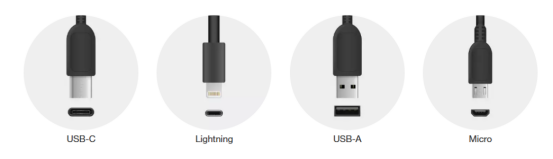
Connector Types
  • USB-C (Type-C): The mainstream interface for modern Android phones, laptops, tablets, etc., reversible.
  • Lightning: Exclusive to Apple devices like iPhones and iPads (though transitioning to Type-C in regions like the EU).
  • USB-A: The standard USB port, commonly found on computers and chargers.
  • Micro-USB: Used by older Android phones, Bluetooth earphones, power banks, etc., gradually being phased out.

A cable is typically defined by its two ends, e.g., USB-A to Lightning cable, USB-C to Type-C cable, etc.

Summary

Choosing the best fast charging cable is not only about finding the highest wattage or the lower price. It is about finding a cable that matches your device’s charging protocol, supports the required power rating, offers reliable build quality, and meets your daily usage needs.

Leave a message
Name*
Tel/Whatsapp*
Email*
Message*
We use Cookie to improve your online experience. By continuing browsing this website, we assume you agree our use of Cookie.